

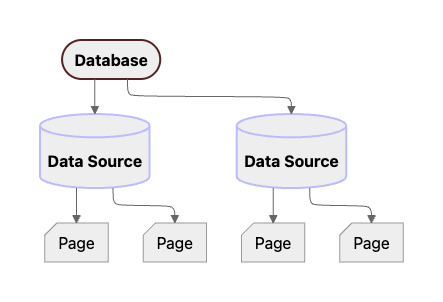
Diagram of the new Notion API data model. A database is a parent of one or more data sources, each of which parents zero or more pages. Previously, databases could only have one data source, so the concepts were combined in the API until 2025.
2025-09-03, there’s a suite of APIs for managing data sources:
- Create a data source: add an additional data source for an existing Database
- Update a data source: update attributes, such as the
properties, of a data source - Retrieve a data source
- Query a data source
Object fields
Properties marked with an asterisk (*) are available to connections with any capabilities. Other properties require read content capabilities in order to be returned from the Notion API. For more information on connection capabilities, see the capabilities guide.
Sync metadata
The optional, read-onlysync_metadata field describes stored sync information. It is returned when retrieving or listing a readable synced data source. Retrieve a database also includes it on each readable entry in data_sources. Search, create, and update responses do not include it.
The field requires read access to the data source and a read capability on the connection. It is omitted from partial responses and when stored metadata is unavailable or invalid. Its absence does not prove that the data source is not synced. These reads do not refresh the sync or query its provider, so the metadata is not a live health check.
The object has one of these stored representations:
Sync IDs and collection keys are identifiers, not credentials, and do not grant access to manage a sync. This field does not include credentials, errors from the provider, or sync configuration.
For example, an external database sync returns:
Legacy sync state
sync_state is optional and applies only to legacy synced data sources. When present, it contains a required syncing field and may contain the timestamps below.
All timestamps are UTC ISO 8601 strings. Missing timestamps and timestamps that cannot be represented are omitted rather than returned as null.