

filter in the body of a data source query. This example returns rows where the Task completed checkbox is checked. Set NOTION_API_KEY and NOTION_DATA_SOURCE_ID before running it.
and or or.
If no filter is provided, non-archived pages in the data source will be returned with pagination. To query archived pages, set is_archived to true in the Query a data source request body.
The filter object
Eachfilter object contains the following fields:
The filter object mimics the data source filter option in the Notion UI.
Type-specific filter conditions
Checkbox
Date
For the
after, before, equals, on_or_before, and on_or_after fields, if a date string with a time is provided, then the comparison is done with millisecond precision.If no timezone is provided, then the timezone defaults to UTC.date property value types and the timestamp property types created_time and last_edited_time.
The condition contains the below fields:
Relative date values
Theafter, before, equals, on_or_after, and on_or_before fields accept the following relative date strings in addition to ISO 8601 dates. These are resolved at query time:
Files
Formula
The primary field of theformula filter condition object matches the type of the formula’s result. For example, to filter a formula property that computes a checkbox, use a formula filter condition object with a checkbox field containing a checkbox filter condition as its value.
Multi-select
Number
People
You can apply a people filter condition topeople, created_by, and last_edited_by data source property types.
The people filter condition contains the following fields:
The
"me" value resolves to the user associated with the token. For public connections, this is the user who completed the OAuth flow. For personal access tokens, this is the user who created the token. For internal connections, there is no associated user — contains: "me" returns no results and does_not_contain: "me" matches all entries.Relation
Rich text
Rollup
A rollup data source property can evaluate to an array, date, or number value. The filter condition for the rollup property contains arollup key and a corresponding object value that depends on the computed value type.
Filter conditions for array rollup values
Filter conditions for date rollup values
A rollup value is stored as a date only if the “Earliest date”, “Latest date”, or “Date range” computation is selected for the property in the Notion UI.
Filter conditions for number rollup values
Select
Status
rollup filter, equals and does_not_equal match only option names. Rollup filters aren’t checked against the target property’s options or groups, so an unknown name matches nothing instead of returning an error.
Status group filters beta
Each status option belongs to a status group, such as “To-do”, “In progress”, or “Complete”. An option and a group can have the same name. Notion’s default status property has an “In progress” option in the “In progress” group, for example. There,"equals": "In progress" matches only the option. Entries with other options in that group, such as “In review”, don’t match, and there’s no way to name the whole group.
To fix this, send the Notion-Beta: status-group-filters-2026-10-06 header. We recommend it for new integrations that filter by status. With the header:
group_equalsandgroup_does_not_equalmatch status groups. They work in compound filters, quick filters, and rollup filters.equalsanddoes_not_equalmatch only option names. A group name there returns avalidation_errorwith the correct group operator.- Some older databases store translated group names. Direct status filters accept the stored and English names. Inside a rollup filter, send the stored name.
- Views return saved group filters with group operators. Mixed filters return nested
ororandconditions when possible.
validation_error.
Timestamp
Use a timestamp filter condition to filter results based oncreated_time or last_edited_time values.
Verification
Both fields accept
verified, expired, or none.
ID
Use a timestamp filter condition to filter results based on theunique_id value.
Compound filter conditions
You can use a compound filter condition to limit the results of a data source query based on multiple conditions. This mimics filter chaining in the Notion UI.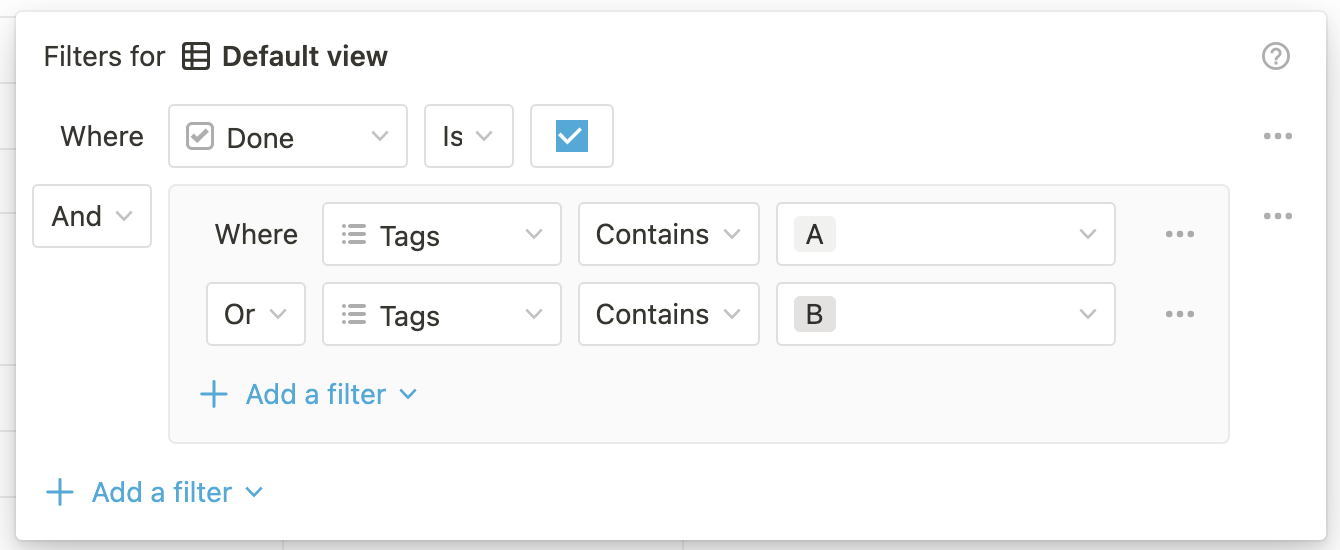
An example filter chain in the Notion UI
Filter object
and or or key with a value that is an array of filter objects or nested compound filter objects. Nesting is supported up to two levels deep.