> ## Documentation Index
> Fetch the complete documentation index at: https://developers.notion.com/llms.txt
> Use this file to discover all available pages before exploring further.
# Filter database entries
**Deprecated as of version 2025-09-03**
This page describes the API for versions up to and including `2022-06-28`. In the new `2025-09-03` version, the concepts of databases and data sources were split up, as described in [Upgrading to 2025-09-03](/guides/get-started/upgrade-guide-2025-09-03).
Refer to the new page instead:
* [Filter data source entries](/reference/filter-data-source-entries)
When you [query a database](/reference/post-database-query), you can send a `filter` object in the body of the request that limits the returned entries based on the specified criteria.
For example, the below query limits the response to entries where the `"Task completed"` `checkbox` property value is `true`:
```curl cURL theme={null}
curl -X POST 'https://api.notion.com/v1/databases/897e5a76ae524b489fdfe71f5945d1af/query' \
-H 'Authorization: Bearer '"$NOTION_API_KEY"'' \
-H 'Notion-Version: 2022-06-28' \
-H "Content-Type: application/json" \
--data '{
"filter": {
"property": "Task completed",
"checkbox": {
"equals": true
}
}
}'
```
```javascript JavaScript theme={null}
const { Client } = require('@notionhq/client');
const notion = new Client({ auth: process.env.NOTION_API_KEY });
// replace with your own database ID
const databaseId = 'd9824bdc-8445-4327-be8b-5b47500af6ce';
const filteredRows = async () => {
const response = await notion.databases.query({
database_id: databaseId,
filter: {
property: "Task completed",
checkbox: {
equals: true
}
},
});
return response;
}
```
Filters can be chained with the `and` and `or` keys so that multiple filters are applied at the same time. (See [Query a database](/reference/post-database-query) for additional examples.)
```json JSON theme={null}
{
"and": [
{
"property": "Done",
"checkbox": {
"equals": true
}
},
{
"or": [
{
"property": "Tags",
"contains": "A"
},
{
"property": "Tags",
"contains": "B"
}
]
}
]
}
```
If no filter is provided, non-archived pages in the database will be returned with pagination.
## The filter object
Each `filter` object contains the following fields:
| Field | Type | Description | Example value |
| :--------------------------------------------------------------------------------------------------------------------------------------------------------------------------------------------------------------------------------- | :------- | :---------------------------------------------------------------------------------------------------------------------------------------------------------------------------------------------------------------------------------------------------------- | :------------------------------- |
| `property` | `string` | The name of the property as it appears in the database, or the property ID. | `"Task completed"` |
| `checkbox`
`date`
`files`
`formula`
`multi_select`
`number`
`people`
`phone_number`
`relation`
`rich_text`
`select`
`status`
`timestamp`
`verification`
`ID` | `object` | The type-specific filter condition for the query. Only types listed in the Field column of this table are supported.
Refer to [type-specific filter conditions](#type-specific-filter-conditions) for details on corresponding object values. | `"checkbox": { "equals": true }` |
```json Example checkbox filter object theme={null}
{
"filter": {
"property": "Task completed",
"checkbox": {
"equals": true
}
}
}
```
The filter object mimics the database [filter option in the Notion UI](https://www.notion.com/help/views-filters-and-sorts).
## Type-specific filter conditions
### Checkbox
| Field | Type | Description | Example value |
| :--------------- | :-------- | :-------------------------------------------------------------------------------------------------------------------------------------------------------- | :------------ |
| `equals` | `boolean` | Whether a `checkbox` property value matches the provided value exactly.
Returns or excludes all database entries with an exact value match. | `false` |
| `does_not_equal` | `boolean` | Whether a `checkbox` property value differs from the provided value.
Returns or excludes all database entries with a difference in values. | `true` |
```json Example checkbox filter condition theme={null}
{
"filter": {
"property": "Task completed",
"checkbox": {
"does_not_equal": true
}
}
}
```
### Date
For the `after`, `before`, `equals, on_or_before`, and `on_or_after` fields, if a date string with a time is provided, then the comparison is done with millisecond precision.
If no timezone is provided, then the timezone defaults to UTC.
A date filter condition can be used to limit `date` property value types and the [timestamp](#timestamp) property types `created_time` and `last_edited_time`.
The condition contains the below fields:
| Field | Type | Description | Example value |
| :------------- | :----------------------------------------------------------------------------------------------------------- | :------------------------------------------------------------------------------------------------------------------------------------------------------------ | :--------------------------- |
| `after` | `string` ([ISO 8601 date](https://en.wikipedia.org/wiki/ISO_8601) or [relative date](#relative-date-values)) | The value to compare the date property value against.
Returns database entries where the date property value is after the provided date. | `"2021-05-10"` `"yesterday"` |
| `before` | `string` ([ISO 8601 date](https://en.wikipedia.org/wiki/ISO_8601) or [relative date](#relative-date-values)) | The value to compare the date property value against.
Returns database entries where the date property value is before the provided date. | `"2021-05-10"` `"tomorrow"` |
| `equals` | `string` ([ISO 8601 date](https://en.wikipedia.org/wiki/ISO_8601) or [relative date](#relative-date-values)) | The value to compare the date property value against.
Returns database entries where the date property value is the provided date. | `"2021-05-10"` `"today"` |
| `is_empty` | `true` | The value to compare the date property value against. Returns database entries where the date property value contains no data. | `true` |
| `is_not_empty` | `true` | The value to compare the date property value against. Returns database entries where the date property value is not empty. | `true` |
| `next_month` | `object` (empty) | A filter that limits the results to database entries where the date property value is within the next month. | `{}` |
| `next_week` | `object` (empty) | A filter that limits the results to database entries where the date property value is within the next week. | `{}` |
| `next_year` | `object` (empty) | A filter that limits the results to database entries where the date property value is within the next year. | `{}` |
| `on_or_after` | `string` ([ISO 8601 date](https://en.wikipedia.org/wiki/ISO_8601) or [relative date](#relative-date-values)) | The value to compare the date property value against.
Returns database entries where the date property value is on or after the provided date. | `"2021-05-10"` `"today"` |
| `on_or_before` | `string` ([ISO 8601 date](https://en.wikipedia.org/wiki/ISO_8601) or [relative date](#relative-date-values)) | The value to compare the date property value against.
Returns database entries where the date property value is on or before the provided date. | `"2021-05-10"` `"today"` |
| `past_month` | `object` (empty) | A filter that limits the results to database entries where the `date` property value is within the past month. | `{}` |
| `past_week` | `object` (empty) | A filter that limits the results to database entries where the `date` property value is within the past week. | `{}` |
| `past_year` | `object` (empty) | A filter that limits the results to database entries where the `date` property value is within the past year. | `{}` |
| `this_week` | `object` (empty) | A filter that limits the results to database entries where the `date` property value is this week. | `{}` |
#### Relative date values
The `after`, `before`, `equals`, `on_or_after`, and `on_or_before` fields accept the following relative date strings in addition to ISO 8601 dates. These are resolved at query time:
| Value | Description |
| :--------------------- | :---------------------------------- |
| `"today"` | The current date. |
| `"tomorrow"` | The day after the current date. |
| `"yesterday"` | The day before the current date. |
| `"one_week_ago"` | Seven days before the current date. |
| `"one_week_from_now"` | Seven days after the current date. |
| `"one_month_ago"` | One month before the current date. |
| `"one_month_from_now"` | One month after the current date. |
```json Example date filter condition theme={null}
{
"filter": {
"property": "Due date",
"date": {
"on_or_after": "2023-02-08"
}
}
}
```
```json Example relative date filter condition theme={null}
{
"filter": {
"property": "Due date",
"date": {
"on_or_after": "today"
}
}
}
```
### Files
| Field | Type | Description | Example value |
| :------------- | :----- | :------------------------------------------------------------------------------------------------------------------------------------------- | :------------ |
| `is_empty` | `true` | Whether the files property value does not contain any data.
Returns all database entries with an empty `files` property value. | `true` |
| `is_not_empty` | `true` | Whether the `files` property value contains data.
Returns all entries with a populated `files` property value. | `true` |
```json Example files filter condition theme={null}
{
"filter": {
"property": "Blueprint",
"files": {
"is_not_empty": true
}
}
}
```
### Formula
The primary field of the `formula` filter condition object matches the type of the formula’s result. For example, to filter a formula property that computes a `checkbox`, use a `formula` filter condition object with a `checkbox` field containing a checkbox filter condition as its value.
| Field | Type | Description | Example value |
| :--------- | :------- | :-------------------------------------------------------------------------------------------------------------------------------------------------------------------------------- | :----------------------------------------------------- |
| `checkbox` | `object` | A [checkbox](#checkbox) filter condition to compare the formula result against.
Returns database entries where the formula result matches the provided condition. | Refer to the [checkbox](#checkbox) filter condition. |
| `date` | `object` | A [date](#date) filter condition to compare the formula result against.
Returns database entries where the formula result matches the provided condition. | Refer to the [date](#date) filter condition. |
| `number` | `object` | A [number](#number) filter condition to compare the formula result against.
Returns database entries where the formula result matches the provided condition. | Refer to the [number](#number) filter condition. |
| `string` | `object` | A [rich text](#rich-text) filter condition to compare the formula result against.
Returns database entries where the formula result matches the provided condition. | Refer to the [rich text](#rich-text) filter condition. |
```json Example formula filter condition theme={null}
{
"filter": {
"property": "One month deadline",
"formula": {
"date":{
"after": "2021-05-10"
}
}
}
}
```
### Multi-select
| Field | Type | Description | Example value |
| :----------------- | :--------------------- | :------------------------------------------------------------------------------------------------------------------------------------------------------------------------------ | :----------------------------------------- |
| `contains` | `string` or `string[]` | The value(s) to compare the multi-select property value against.
Returns database entries where the multi-select value matches any of the provided values. | `"Marketing"` or `["Marketing", "Sales"]` |
| `does_not_contain` | `string` or `string[]` | The value(s) to compare the multi-select property value against.
Returns database entries where the multi-select value does not match any of the provided values. | `"Engineering"` or `["Engineering", "QA"]` |
| `is_empty` | `true` | Whether the multi-select property value is empty.
Returns database entries where the multi-select value does not contain any data. | `true` |
| `is_not_empty` | `true` | Whether the multi-select property value is not empty.
Returns database entries where the multi-select value does contains data. | `true` |
```json Example multi-select filter condition theme={null}
{
"filter": {
"property": "Programming language",
"multi_select": {
"contains": "TypeScript"
}
}
}
```
### Number
| Field | Type | Description | Example value |
| :------------------------- | :------- | :----------------------------------------------------------------------------------------------------------------------------------------------------------------------------------- | :------------ |
| `does_not_equal` | `number` | The `number` to compare the number property value against.
Returns database entries where the number property value differs from the provided `number`. | `42` |
| `equals` | `number` | The `number` to compare the number property value against.
Returns database entries where the number property value is the same as the provided number. | `42` |
| `greater_than` | `number` | The `number` to compare the number property value against.
Returns database entries where the number property value exceeds the provided `number`. | `42` |
| `greater_than_or_equal_to` | `number` | The `number` to compare the number property value against.
Returns database entries where the number property value is equal to or exceeds the provided `number`. | `42` |
| `is_empty` | `true` | Whether the `number` property value is empty.
Returns database entries where the number property value does not contain any data. | `true` |
| `is_not_empty` | `true` | Whether the number property value is not empty.
Returns database entries where the number property value contains data. | `true` |
| `less_than` | `number` | The `number` to compare the number property value against.
Returns database entries where the number property value is less than the provided `number`. | `42` |
| `less_than_or_equal_to` | `number` | The `number` to compare the number property value against.
Returns database entries where the number property value is equal to or is less than the provided `number`. | `42` |
```json Example number filter condition theme={null}
{
"filter": {
"property": "Estimated working days",
"number": {
"less_than_or_equal_to": 5
}
}
}
```
### People
You can apply a people filter condition to `people`, `created_by`, and `last_edited_by` database property types.
The people filter condition contains the following fields:
| Field | Type | Description | Example value |
| :----------------- | :-------------------------- | :-------------------------------------------------------------------------------------------------------------------------------------------------------------------------------------------------------------------------------- | :--------------------------------------- |
| `contains` | `string` (UUIDv4) or `"me"` | The value to compare the people property value against.
Returns database entries where the people property value contains the provided user. Pass a user UUID or `"me"` to match the current user (see note below). | `"6c574cee-ca68-41c8-86e0-1b9e992689fb"` |
| `does_not_contain` | `string` (UUIDv4) or `"me"` | The value to compare the people property value against. Returns database entries where the people property value does not contain the provided user. Pass a user UUID or `"me"` to match the current user (see note below). | `"6c574cee-ca68-41c8-86e0-1b9e992689fb"` |
| `is_empty` | `true` | Whether the people property value does not contain any data.
Returns database entries where the people property value does not contain any data. | `true` |
| `is_not_empty` | `true` | Whether the people property value contains data.
Returns database entries where the people property value is not empty. | `true` |
```json Example people filter condition theme={null}
{
"filter": {
"property": "Last edited by",
"people": {
"contains": "c2f20311-9e54-4d11-8c79-7398424ae41e"
}
}
}
```
```json Example "me" filter condition theme={null}
{
"filter": {
"property": "Assignee",
"people": {
"contains": "me"
}
}
}
```
The `"me"` value resolves to the user associated with the token. For [public connections](/guides/get-started/overview#connection-types), this is the user who completed the OAuth flow. For [personal access tokens](/guides/get-started/personal-access-tokens), this is the user who created the token. For [internal connections](/guides/get-started/overview#connection-types), there is no associated user — `contains: "me"` returns no results and `does_not_contain: "me"` matches all entries.
### Relation
| Field | Type | Description | Example value |
| :----------------- | :---------------- | :----------------------------------------------------------------------------------------------------------------------------------------------------------------- | :--------------------------------------- |
| `contains` | `string` (UUIDv4) | The value to compare the relation property value against.
Returns database entries where the relation property value contains the provided `string`. | `"6c574cee-ca68-41c8-86e0-1b9e992689fb"` |
| `does_not_contain` | `string` (UUIDv4) | The value to compare the relation property value against.
Returns entries where the relation property value does not contain the provided `string`. | `"6c574cee-ca68-41c8-86e0-1b9e992689fb"` |
| `is_empty` | `true` | Whether the relation property value does not contain data.
Returns database entries where the relation property value does not contain any data. | `true` |
| `is_not_empty` | `true` | Whether the relation property value contains data.
Returns database entries where the property value is not empty. | `true` |
```json Example relation filter condition theme={null}
{
"filter": {
"property": "✔️ Task List",
"relation": {
"contains": "0c1f7cb280904f18924ed92965055e32"
}
}
}
```
### Rich text
| Field | Type | Description | Example value |
| :----------------- | :------- | :---------------------------------------------------------------------------------------------------------------------------------------------------------------------- | :-------------- |
| `contains` | `string` | The `string` to compare the text property value against.
Returns database entries with a text property value that includes the provided `string`. | `"Moved to Q2"` |
| `does_not_contain` | `string` | The `string` to compare the text property value against.
Returns database entries with a text property value that does not include the provided `string`. | `"Moved to Q2"` |
| `does_not_equal` | `string` | The `string` to compare the text property value against.
Returns database entries with a text property value that does not match the provided `string`. | `"Moved to Q2"` |
| `ends_with` | `string` | The `string` to compare the text property value against.
Returns database entries with a text property value that ends with the provided `string`. | `"Q2"` |
| `equals` | `string` | The `string` to compare the text property value against.
Returns database entries with a text property value that matches the provided `string`. | `"Moved to Q2"` |
| `is_empty` | `true` | Whether the text property value does not contain any data.
Returns database entries with a text property value that is empty. | `true` |
| `is_not_empty` | `true` | Whether the text property value contains any data.
Returns database entries with a text property value that contains data. | `true` |
| `starts_with` | `string` | The `string` to compare the text property value against.
Returns database entries with a text property value that starts with the provided `string`. | "Moved" |
```json Example rich text filter condition theme={null}
{
"filter": {
"property": "Description",
"rich_text": {
"contains": "cross-team"
}
}
}
```
### Rollup
A rollup database property can evaluate to an array, date, or number value. The filter condition for the rollup property contains a `rollup` key and a corresponding object value that depends on the computed value type.
#### Filter conditions for `array` rollup values
| Field | Type | Description | Example value |
| :------ | :------- | :------------------------------------------------------------------------------------------------------------------------------------------------------------------------------------------------------------------------------------------------- | :-------------------------------------------------- |
| `any` | `object` | The value to compare each rollup property value against. Can be a [filter condition](#type-specific-filter-conditions) for any other type.
Returns database entries where the rollup property value matches the provided criteria. | `"rich_text": { "contains": "Take Fig on a walk" }` |
| `every` | `object` | The value to compare each rollup property value against. Can be a [filter condition](#type-specific-filter-conditions) for any other type.
Returns database entries where every rollup property value matches the provided criteria. | `"rich_text": { "contains": "Take Fig on a walk" }` |
| `none` | `object` | The value to compare each rollup property value against. Can be a [filter condition](#type-specific-filter-conditions) for any other type.
Returns database entries where no rollup property value matches the provided criteria. | `"rich_text": { "contains": "Take Fig on a walk" }` |
```json Example array rollup filter condition theme={null}
{
"filter": {
"property": "Related tasks",
"rollup": {
"any": {
"rich_text": {
"contains": "Migrate database"
}
}
}
}
}
```
#### Filter conditions for `date` rollup values
A rollup value is stored as a `date` only if the "Earliest date", "Latest date", or "Date range" computation is selected for the property in the Notion UI.
| Field | Type | Description | Example value |
| :----- | :------- | :------------------------------------------------------------------------------------------------------------------------------------------------------------------ | :------------------------------------------- |
| `date` | `object` | A [date](#date) filter condition to compare the rollup value against.
Returns database entries where the rollup value matches the provided condition. | Refer to the [date](#date) filter condition. |
```json Example date rollup filter condition theme={null}
{
"filter": {
"property": "Parent project due date",
"rollup": {
"date": {
"on_or_before": "2023-02-08"
}
}
}
}
```
#### Filter conditions for `number` rollup values
| Field | Type | Description | Example value |
| :------- | :------- | :---------------------------------------------------------------------------------------------------------------------------------------------------------------------- | :----------------------------------------------- |
| `number` | `object` | A [number](#number) filter condition to compare the rollup value against.
Returns database entries where the rollup value matches the provided condition. | Refer to the [number](#number) filter condition. |
```json Example number rollup filter condition theme={null}
{
"filter": {
"property": "Total estimated working days",
"rollup": {
"number": {
"does_not_equal": 42
}
}
}
}
```
### Select
| Field | Type | Description | Example value |
| :--------------- | :--------------------- | :--------------------------------------------------------------------------------------------------------------------------------------------------------------------------- | :----------------------------------- |
| `equals` | `string` or `string[]` | The value(s) to compare the select property value against.
Returns database entries where the select property value matches any of the provided values. | `"This week"` or `["Low", "Medium"]` |
| `does_not_equal` | `string` or `string[]` | The value(s) to compare the select property value against.
Returns database entries where the select property value does not match any of the provided values. | `"Backlog"` or `["Done", "Archive"]` |
| `is_empty` | `true` | Whether the select property value does not contain data.
Returns database entries where the select property value is empty. | `true` |
| `is_not_empty` | `true` | Whether the select property value contains data.
Returns database entries where the select property value is not empty. | `true` |
```json Example select filter condition theme={null}
{
"filter": {
"property": "Frontend framework",
"select": {
"equals": "React"
}
}
}
```
### Status
| Field | Type | Description | Example value |
| :--------------- | :------------------ | :---------------------------------------------------------------------------------------------------------------------------------------------------------------------------------------------------------------------------------------------------- | :--------------------------------------- |
| equals | string or string\[] | The value(s) to compare the status property value against.
Returns database entries where the status property value matches any of the provided values. Status group names (e.g. "To-do", "In progress", "Complete") are also accepted. | "This week" or \["To-do", "In progress"] |
| does\_not\_equal | string or string\[] | The value(s) to compare the status property value against.
Returns database entries where the status property value does not match any of the provided values. | "Backlog" or \["Done", "Archive"] |
| is\_empty | true | Whether the status property value does not contain data.
Returns database entries where the status property value is empty. | true |
| is\_not\_empty | true | Whether the status property value contains data.
Returns database entries where the status property value is not empty. | true |
```json Example status filter condition theme={null}
{
"filter": {
"property": "Project status",
"status": {
"equals": "Not started"
}
}
}
```
### Timestamp
Use a timestamp filter condition to filter results based on `created_time` or `last_edited_time` values.
| Field | Type | Description | Example value |
| :------------------------------- | :------------------------------- | :----------------------------------------------------------------------- | :------------------------------------------- |
| timestamp | created\_time last\_edited\_time | A constant string representing the type of timestamp to use as a filter. | "created\_time" |
| created\_time last\_edited\_time | object | A date filter condition used to filter the specified timestamp. | Refer to the [date](#date) filter condition. |
```json Example timestamp filter condition for created_time theme={null}
{
"filter": {
"timestamp": "created_time",
"created_time": {
"on_or_before": "2022-10-13"
}
}
}
```
The `timestamp` filter condition does not require a property name. The API throws an error if you provide one.
### Verification
| Field | Type | Description | Example value |
| :----- | :----- | :----------------------------------------------------------------------------------------------------------------------------------------------------------------------------------------------- | :------------ |
| status | string | The verification status being queried. Valid options are: `verified`, `expired`, `none`
Returns database entries where the current verification status matches the queried status. | "verified" |
```json Example verification filter condition for getting verified pages theme={null}
{
"filter": {
"property": "verification",
"verification": {
"status": "verified"
}
}
}
```
### ID
Use a timestamp filter condition to filter results based on the `unique_id` value.
| Field | Type | Description | Example value |
| :------------------------- | :------- | :------------------------------------------------------------------------------------------------------------------------------------------------------------------------------------- | :------------ |
| `does_not_equal` | `number` | The value to compare the unique\_id property value against.
Returns database entries where the unique\_id property value differs from the provided value. | `42` |
| `equals` | `number` | The value to compare the unique\_id property value against.
Returns database entries where the unique\_id property value is the same as the provided value. | `42` |
| `greater_than` | `number` | The value to compare the unique\_id property value against.
Returns database entries where the unique\_id property value exceeds the provided value. | `42` |
| `greater_than_or_equal_to` | `number` | The value to compare the unique\_id property value against.
Returns database entries where the unique\_id property value is equal to or exceeds the provided value. | `42` |
| `less_than` | `number` | The value to compare the unique\_id property value against.
Returns database entries where the unique\_id property value is less than the provided value. | `42` |
| `less_than_or_equal_to` | `number` | The value to compare the unique\_id property value against.
Returns database entries where the unique\_id property value is equal to or is less than the provided value. | `42` |
```json Example ID filter condition theme={null}
{
"filter": {
"and": [
{
"property": "ID",
"unique_id": {
"greater_than": 1
}
},
{
"property": "ID",
"unique_id": {
"less_than": 3
}
}
]
}
}
```
## Compound filter conditions
You can use a compound filter condition to limit the results of a database query based on multiple conditions. This mimics filter chaining in the Notion UI.
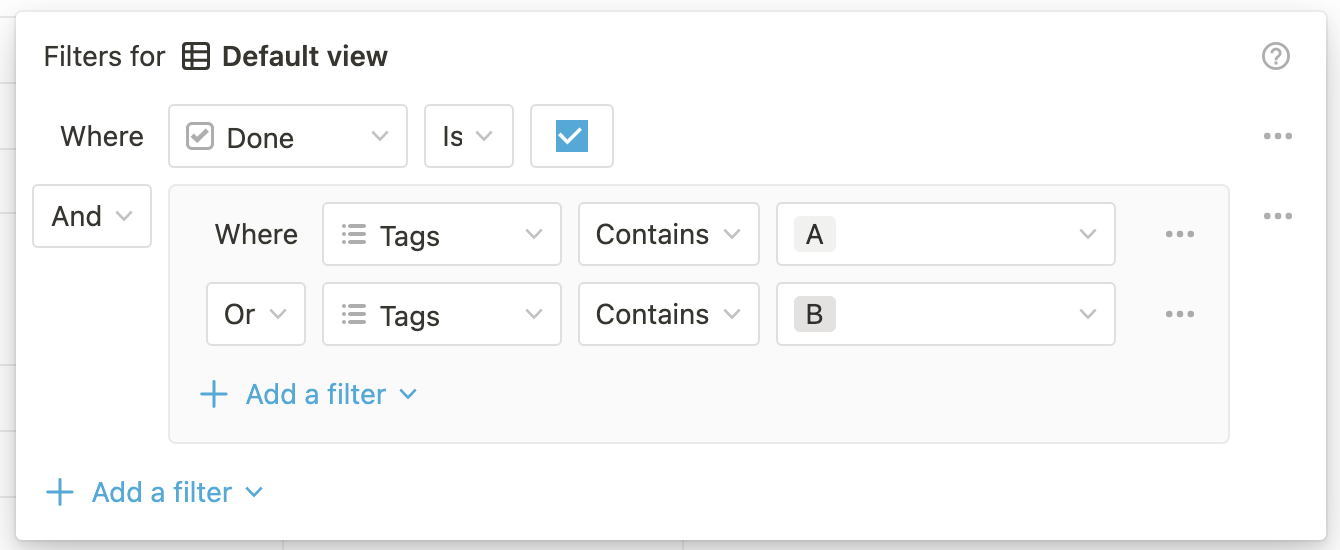 The above filters in the Notion UI are equivalent to the following compound filter condition via the API:
```json JSON theme={null}
{
"and": [
{
"property": "Done",
"checkbox": {
"equals": true
}
},
{
"or": [
{
"property": "Tags",
"contains": "A"
},
{
"property": "Tags",
"contains": "B"
}
]
}
]
}
```
A compound filter condition contains an `and` or `or` key with a value that is an array of filter objects or nested compound filter objects. Nesting is supported up to two levels deep.
| Field | Type | Description | Example value |
| :---- | :------ | :----------------------------------------------------------------------------------------------------------------------------------------------------------------------------------------- | :--------------------------- |
| `and` | `array` | An array of [filter](#type-specific-filter-conditions) objects or compound filter conditions.
The above filters in the Notion UI are equivalent to the following compound filter condition via the API:
```json JSON theme={null}
{
"and": [
{
"property": "Done",
"checkbox": {
"equals": true
}
},
{
"or": [
{
"property": "Tags",
"contains": "A"
},
{
"property": "Tags",
"contains": "B"
}
]
}
]
}
```
A compound filter condition contains an `and` or `or` key with a value that is an array of filter objects or nested compound filter objects. Nesting is supported up to two levels deep.
| Field | Type | Description | Example value |
| :---- | :------ | :----------------------------------------------------------------------------------------------------------------------------------------------------------------------------------------- | :--------------------------- |
| `and` | `array` | An array of [filter](#type-specific-filter-conditions) objects or compound filter conditions.
Returns database entries that match **all** of the provided filter conditions. | Refer to the examples below. |
| or | array | An array of [filter](#type-specific-filter-conditions) objects or compound filter conditions.
Returns database entries that match **any** of the provided filter conditions | Refer to the examples below. |
### Example compound filter conditions
```json Example compound filter condition for a checkbox and number property value theme={null}
{
"filter": {
"and": [
{
"property": "Complete",
"checkbox": {
"equals": true
}
},
{
"property": "Working days",
"number": {
"greater_than": 10
}
}
]
}
}
```
```json Example nested filter condition theme={null}
{
"filter": {
"or": [
{
"property": "Description",
"rich_text": {
"contains": "2023"
}
},
{
"and": [
{
"property": "Department",
"select": {
"equals": "Engineering"
}
},
{
"property": "Priority goal",
"checkbox": {
"equals": true
}
}
]
}
]
}
}
```